How to organise family contacts
Three passes over an address book you have been adding to for ten years.
Short answer
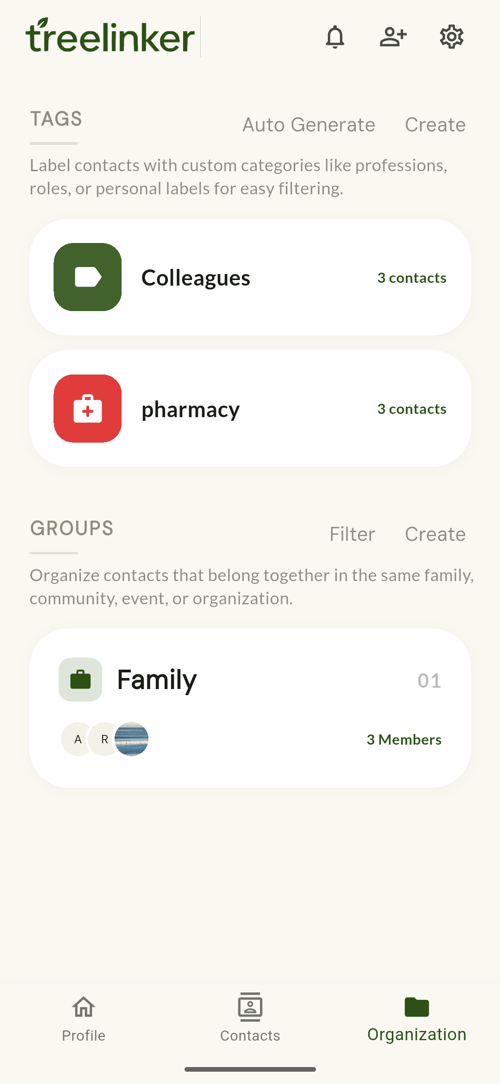
Organise in three passes. First record relationships, so the address book knows who belongs to whom. Second, create groups for the real shared spaces — immediate family, your spouse's family, the neighbourhood. Third, add private tags for the labels that cut across groups, such as Doctor, Plumber or a city. Do them in that order: relationships make the groups obvious, and groups make the missing tags obvious.
Pass one: relationships
Start with the people you contact most. Twenty relationships is enough for the structure of the family to appear, and it is the pass that makes the other two quick.
Pass two: groups
A group should correspond to something real — a family that actually gathers, a street, a class. If nobody would ever be invited into it, it is a tag, not a group.
Groups carry a cover photo, an icon and a member list, and people join by invitation.
Pass three: tags
Tags are private and cut across everything: Doctor, Electrician, Work, University, Emergency, a city name. Each has a colour and an icon so the list stays scannable.
TreeLinker will suggest tags it can infer from your contacts. As with relationships, suggestions are proposals — nothing is created without you.
What to skip
Do not try to tag everybody. The value is in the twenty contacts you actually need to find again, not in a complete taxonomy you will never maintain.
Frequently asked questions
Groups or tags — which should I use?
If other people should see it and be invited into it, use a group. If it is a private label for your own filing, use a tag.
Can I rename a tag later?
Yes. Tags can be edited or deleted from the Organization screen.
Is there a limit?
No practical limit on groups, tags or members.
TreeLinker — a family relationship management app.
Related pages
A contact manager organised by relationship
A contact manager that organises people by how they are related to you, not just by name. Groups, tags, per-contact timelines and key dates, stored on your device.
Tags
Private labels with a colour, an icon and a list of assigned contacts. Nobody else ever sees them.
How to organise your phone contacts
A one-evening method for an address book ten years deep: delete what is dead, merge the duplicates, name people the way you would search for them, then label only the ones you actually need to find.
Start with the contacts you already have
TreeLinker is free on Google Play. No ads, no subscription, and your address book never leaves your phone.
Android. Free. No account required to browse your own contacts.