A family organiser that keeps decisions findable
Group chats bury everything. A named discussion with a poll attached does not.
Short answer
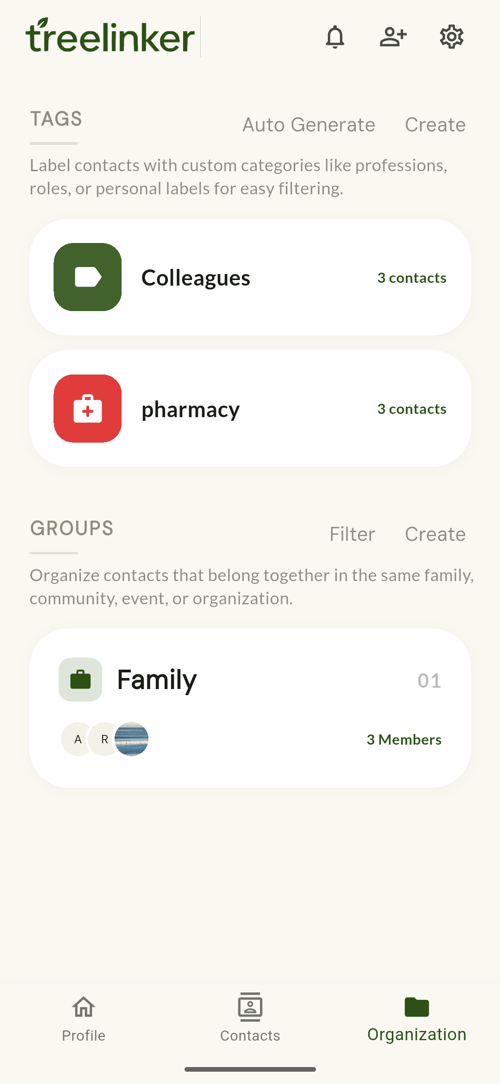
TreeLinker organises the people in your address book two ways at once. Groups are shared, invitation-only spaces for a family, a neighbourhood or a class, where members can run polls and hold named discussions. Tags are private labels — Doctor, Plumber, Cairo — that only you see and that cut across every group. A person can be in several groups and carry several tags at the same time.
Groups are shared; tags are yours
A group has members, a cover photo, an icon and a details screen, and people join by invitation. What happens inside it is visible to everyone in it.
A tag has a name, a colour, an icon, an optional description and a list of assigned contacts. Nobody else ever sees your tags, which is what makes them useful for labels like Doctor or Difficult.
Polls, for the decision everyone keeps re-asking
Any member can create a poll with a question and a few options. Everyone gets one vote, changing your vote replaces the old one rather than adding to it, and you can see who picked what. The creator can close it when it is settled.
It exists because "where should we eat" is the single most common thing a family group needs to resolve, and a chat thread is a bad instrument for it.
Discussions that can be reopened
A discussion has a title — "Eid Dinner 2026" — and everything posted under it stays under it. Months later it is still a named thing in the group's list rather than four hundred messages back in a scroll.
A poll can be attached to a discussion, so the argument and its outcome stay in the same place.
Frequently asked questions
Can other people see my tags?
No. Tags are private to your account. Groups are shared; tags never are.
Can someone join a group without being invited?
No. Groups are invitation-only.
Can a contact be in more than one group?
Yes, and they can carry any number of tags at the same time.
TreeLinker — a family relationship management app.
Related pages
Groups
Private, invitation-only shared spaces for a family, a neighbourhood or a class, with polls, named discussions and shared memories.
Tags
Private labels with a colour, an icon and a list of assigned contacts. Nobody else ever sees them.
How to organise relatives
How to split an extended family into groups that stay useful, and when a private tag is the better tool.
Start with the contacts you already have
TreeLinker is free on Google Play. No ads, no subscription, and your address book never leaves your phone.
Android. Free. No account required to browse your own contacts.