How to create a family tree
The fastest family tree is the one you do not have to type.
Short answer
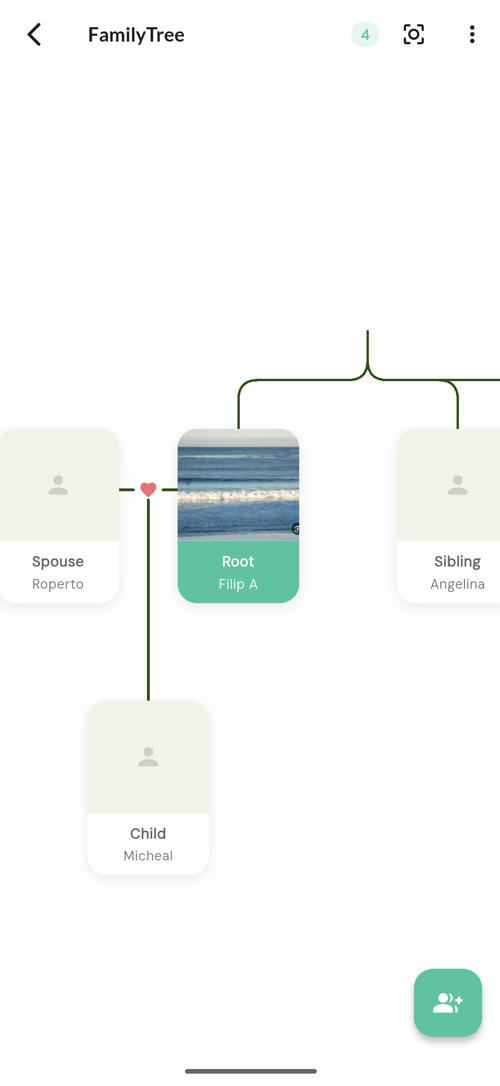
Start from the people already in your phone rather than a blank form. Pick yourself, link one close relative — a parent or a sibling — and the reverse relationship is created automatically. Then work outward one person at a time, accepting the relationships the app infers as the shape fills in. A tree with twenty people in it takes a few minutes this way, against an hour of typing in a traditional genealogy tool.
1. Start with yourself
Your own record is the anchor. Every relationship path is eventually measured from it, and the caller identification card describes people relative to you.
2. Link the closest people first
Parents, siblings, spouse, children. These are the relationships that generate the most inferences later, because almost every other connection in a family runs through one of them.
Record one direction only. The reverse is created for you.
3. Work outward, not alphabetically
Follow the family, not the contact list. From a parent, add their siblings; from those, their children. Each addition makes the next set of suggestions better.
Where a relationship is ambiguous you are asked which type it is rather than having one chosen for you.
4. Accept or refuse the suggestions
Once there is enough structure, TreeLinker starts proposing relationships with a confidence score and an explanation of which existing links produced it. Accept the right ones; ignore the rest. Nothing is written without you.
5. Add the context while you remember it
Key dates, a tag, a note on the timeline. This is the part people postpone and then lose.
Frequently asked questions
How many people do I need before it is useful?
The tree stops being empty at the first relationship. Suggestions start being useful at roughly ten to fifteen people.
What if a relative is not in my contacts?
You can add them manually. They do not need a phone number.
Can two people share a tree?
You can send a tree to another TreeLinker user, who saves the relationships into their own. It is a one-time transfer, not a shared document.
TreeLinker — a family relationship management app.
Related pages
A family tree app that starts from your contacts
Most family tree apps make you type every name from scratch. TreeLinker builds the tree out of the contacts already on your phone, creates reverse relationships automatically, and suggests the ones your tree implies.
Family tree
An interactive family tree you can zoom and pan, built from your contacts, with colour-coded relationship types and automatic reciprocal links.
How to organise relatives
How to split an extended family into groups that stay useful, and when a private tag is the better tool.
Start with the contacts you already have
TreeLinker is free on Google Play. No ads, no subscription, and your address book never leaves your phone.
Android. Free. No account required to browse your own contacts.