Is it safe to store your address book in TreeLinker?
The short answer is that you do not. It stays on the phone. Here is the long answer.
Short answer
You do not store your address book in TreeLinker — it stays on your device. The only thing taken from it is a normalised phone number, sent to check which of your contacts already use the app. What TreeLinker keeps on your account is what you create inside it: relationships, the name you saved for anyone you place in your tree, tags, memories, timeline entries and group membership. Contact notes, postal addresses, email addresses and contact photos never leave the phone, and caller identification matches entirely on the device.
What leaves the phone, exactly
A privacy answer is only worth anything if it is a list. This is the whole of it:
- Normalised phone numbers from your contacts, used to find which of them already use TreeLinker.
- The name you have saved for a person once you place them in your family tree — so they come back named if you reinstall or sign in elsewhere.
- The relationships you record, and the shape of the tree they form.
- Tags, memories, the photos and locations you attach to them, timeline entries, group membership and favourites.
- Your own profile: name, email address, phone number, country, and anything optional you added.
- A push token, so notifications can be routed to your device.
What stays
Contact notes, postal addresses, email addresses, contact photos and every other field in your address book are read on the device and are never uploaded.
Caller identification matches entirely on the phone. An incoming number is compared against contacts you already hold, and is never sent to a server to ask who is calling. There is no shared reverse-number directory anywhere in the product: a caller you have not saved gets no card, and nothing about them is looked up, stored or sent.
The part actually worth thinking about is sharing
Storage is the question people ask; sharing is the one that matters. Sending another user a family tree, or a tag, sends them the name and phone number you saved for each person in it. In a tree those people are family. In a tag they can be anyone — colleagues, neighbours, a list of plumbers — and when the recipient saves the tag, everyone in it they do not already have is added to their own address book.
That is a real disclosure of other people's numbers, made by you. Share only with someone you would be willing to read those numbers out to. What is held for delivery expires after thirty days and is then deleted, whether or not the recipient ever opened it.
The caller card can be read by whoever is in the room
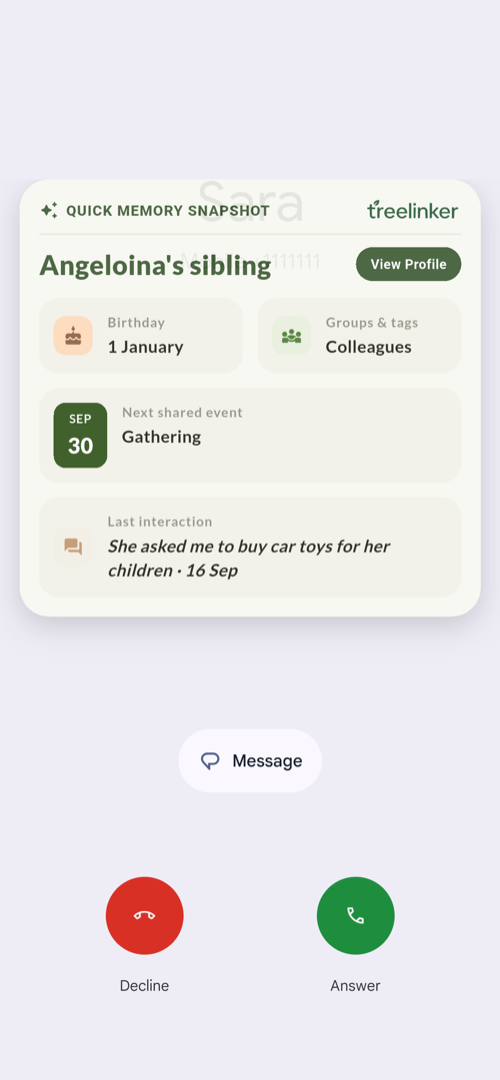
With caller identification on, the card over an incoming call shows how you know the person, their groups and tags, their birthday, and your most recent note about them. It appears on a ringing phone, which means anyone standing near it can read that note. Worth knowing before you write something candid on a contact's timeline.
What the app does not do
Some of the safety of a product is in what it never built.
- No advertising, and no profiling for it.
- No third-party analytics SDKs, and no cookies — it is a native app, not a browser.
- Nothing sold, rented or traded, to anyone, for any purpose.
- No public directory of numbers, and no way for another user to see what you have recorded unless you deliberately share it.
- Passwords hashed with bcrypt and never held in readable form; everything over TLS; session tokens in the Android Keystore, expiring after thirty days of inactivity.
If you want it gone
There is currently no setting that turns off account storage — what you create is saved to your account so it survives a reinstall. The control you do have is deletion, and it is complete: Settings, then Delete Account, erases your data from the device and from the servers permanently. The same request can be made from the delete-account page on this site.
The contacts permission, and the two optional caller-identification permissions, can be revoked at any time in Android's own settings.
Frequently asked questions
Does TreeLinker upload my contacts?
Only normalised phone numbers, and only to match which of your contacts already use TreeLinker. The rest of each contact record stays on your device.
Can another user see who is in my tree?
No. What you record is private to your account unless you deliberately share it — by adding a memory to a group, inviting someone into one, or sending a tree or a tag to a specific person.
Does caller identification look my callers up online?
No. Matching happens on the device, against contacts you already hold. Unknown numbers are not identified at all, because there is nothing to identify them against.
Where is the data actually stored?
In Neo4j AuraDB, a cloud graph database, under your own account and over encrypted connections. Firebase Cloud Messaging routes push notifications and receives nothing but a device token.
How do I delete everything?
Settings, then Delete Account, in the app — or the form on the delete-account page of this site. It permanently erases your data from both the device and our servers.
TreeLinker — a family relationship management app.
Related pages
How to back up your phone address book safely
Sync is not a backup. The five-minute account setup, the quarterly vCard export, and why that export is the most sensitive file you will ever own.
Caller identification
A card that shows how an incoming caller is related to you, built entirely from your own contacts. No database, no uploads, nothing shown for strangers.
A contact manager organised by relationship
A contact manager that organises people by how they are related to you, not just by name. Groups, tags, per-contact timelines and key dates, stored on your device.
Start with the contacts you already have
TreeLinker is free on Google Play. No ads, no subscription, and your address book never leaves your phone.
Android. Free. No account required to browse your own contacts.