How to organize family photos and memories
Your camera roll is sorted by the one thing you never remember: the exact date.
Short answer
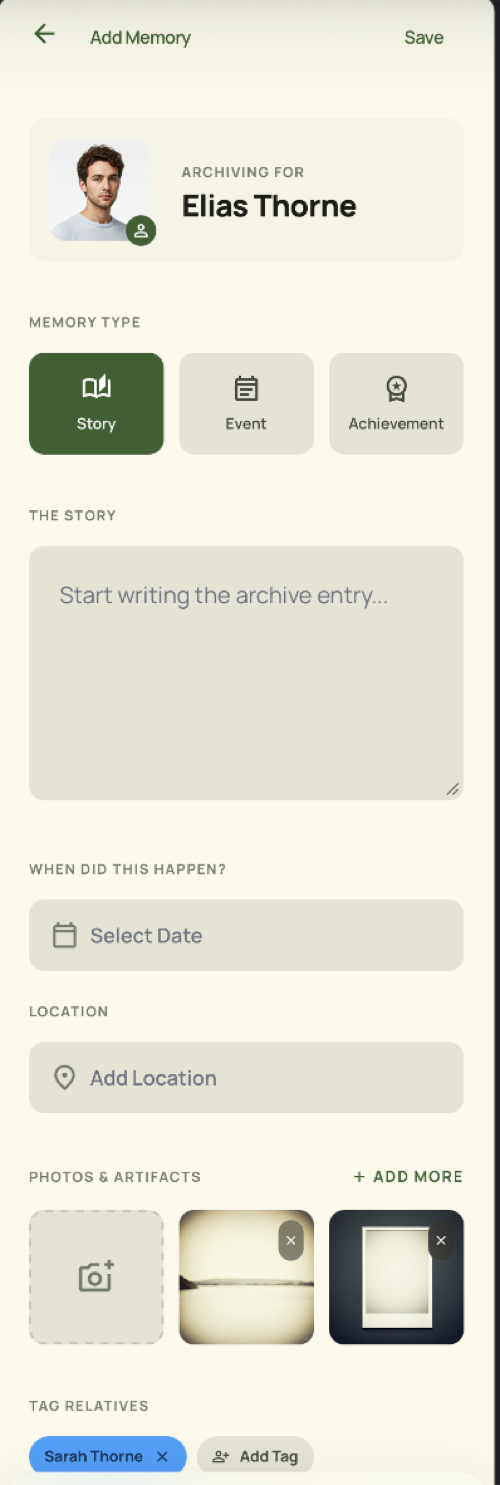
Stop organising family photographs chronologically and organise them by the people in them. Pick the small number of photographs that carry a story, attach each to the person or group it is about, and add the date, the place and two or three sentences of context. A photo library answers "what did I take in June"; a memory attached to a person answers "what do I have of my grandmother", which is the question anyone actually asks.
Date order is the wrong index
Photo apps sort by capture date because that is what the file knows. But nobody searches their family history by date — they search by person, and occasionally by occasion.
The fix is not better search over ten thousand photos. It is picking the few dozen that mean something and filing them by who they are about.
Select ruthlessly
A memory needs one to a handful of photographs, not the whole burst. The selection is most of the work and most of the value.
TreeLinker is not a photo backup service and does not try to be. Keep your backup where it is; put the meaningful images where they will be found.
Write the two sentences
A photograph without context degrades into an unidentified face within one generation. Two sentences — who, where, what was happening — is the difference between a file and a record.
Add the date and the place while you still know them.
Attach it to a person or a group
A memory on a contact shows up when you open that person. A group memory holds the things the whole family did together, so a trip everyone went on is not filed under one person arbitrarily.
Frequently asked questions
Can I attach several photos to one memory?
Yes, along with a date and a place.
Does it back up my photo library?
No. It holds the photographs that belong to a memory, not your whole camera roll.
Is video supported?
Not currently.
TreeLinker — a family relationship management app.
Related pages
Memories
Shared stories, events and key dates with photos, dates and places, attached to the person or group they belong to.
A family memory app built around people
Keep family stories, events and key dates attached to the people they are about, with photos, dates and places — not scattered through a camera roll.
How to document family memories
Record family stories while the people who remember them are still here — attached to the people they are about, with photos, dates and places.
Start with the contacts you already have
TreeLinker is free on Google Play. No ads, no subscription, and your address book never leaves your phone.
Android. Free. No account required to browse your own contacts.