How to add tags to contacts
A tag is a label you will search by later. That is the whole test.
Short answer
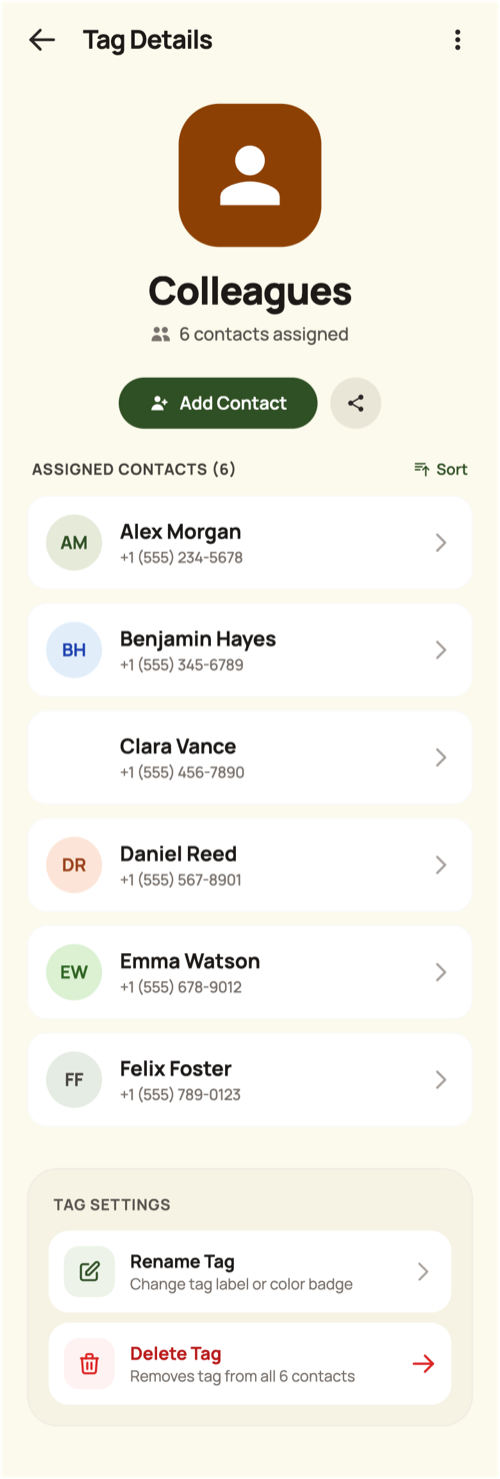
In TreeLinker, tags are created and managed from the Organization screen: give a tag a name, a colour, an icon and an optional description, then assign contacts to it from the tag's own detail view. Tags are private to you and cut across every group, which makes them the right place for labels like Doctor, Electrician or a city name. Before creating one, apply a single test: will you ever search by it? If not, it is a note, not a tag.
Where tags live
Tags are managed in one place — the Organization screen, alongside groups — and contacts are assigned from inside a tag rather than from each contact's profile. That keeps assignment a single deliberate activity instead of a decision you face on every contact you open.
Each tag shows its icon on its colour along with the number of contacts assigned, and its detail view has a search over those contacts.
Choosing tags that survive
Good tags answer a question you have actually asked out loud: who do I call about a leak, which relatives are in Cairo, who is on the emergency list.
Bad tags describe a feeling or a one-off. They get created, used once, and clutter the list forever.
Tags are private; groups are not
Nobody else ever sees your tags. That is what makes them usable for honest labels you would never put in a shared space.
If other people should see it and be invited into it, you want a group instead.
Suggestions, not automation
TreeLinker can propose tags based on what it sees in your contacts. Suggestions are computed in the moment and never stored unless you accept them, so the list stays yours.
Frequently asked questions
Can I assign a tag from a contact's profile?
No. Assignment is managed from the tag's detail view, which keeps it one deliberate activity.
Can two tags share a name?
No. Duplicate names are rejected regardless of capitalisation.
How many tags can a contact have?
As many as you like, and the contact can belong to groups at the same time.
TreeLinker — a family relationship management app.
Related pages
Tags
Private labels with a colour, an icon and a list of assigned contacts. Nobody else ever sees them.
A family organiser that keeps decisions findable
Organise relatives into private groups, label contacts with your own tags, and settle family decisions with polls and named discussions that stay findable.
How to organise family contacts
A method for a large address book: relationships first, then groups for the shared spaces, then private tags for everything that cuts across them.
Start with the contacts you already have
TreeLinker is free on Google Play. No ads, no subscription, and your address book never leaves your phone.
Android. Free. No account required to browse your own contacts.